

How to Migrate from Magento to Shopify
 By Jane Kholmetskaya, CTO — 30 Jun 2026
For years, Magento (now Adobe Commerce) was considered the undisputed heavyweight of enterprise e-commerce. It offered limitless customization—but at a massive cost. In 2026, scaling D2C brands are realizing that maintaining an on-premise, heavy open-source platform is holding them back. When your marketing team has to wait weeks for a developer just to launch a landing page or tweak a checkout flow, your tech stack is blocking your revenue.
Replatforming from Magento to Shopify is no longer about downsizing; it’s about agility. This comprehensive guide walks you through how to transition your store seamlessly, ensuring your historical data, complex product variants, and hard-earned SEO authority remain perfectly intact.
The Heavy Toll of Magento Maintenance
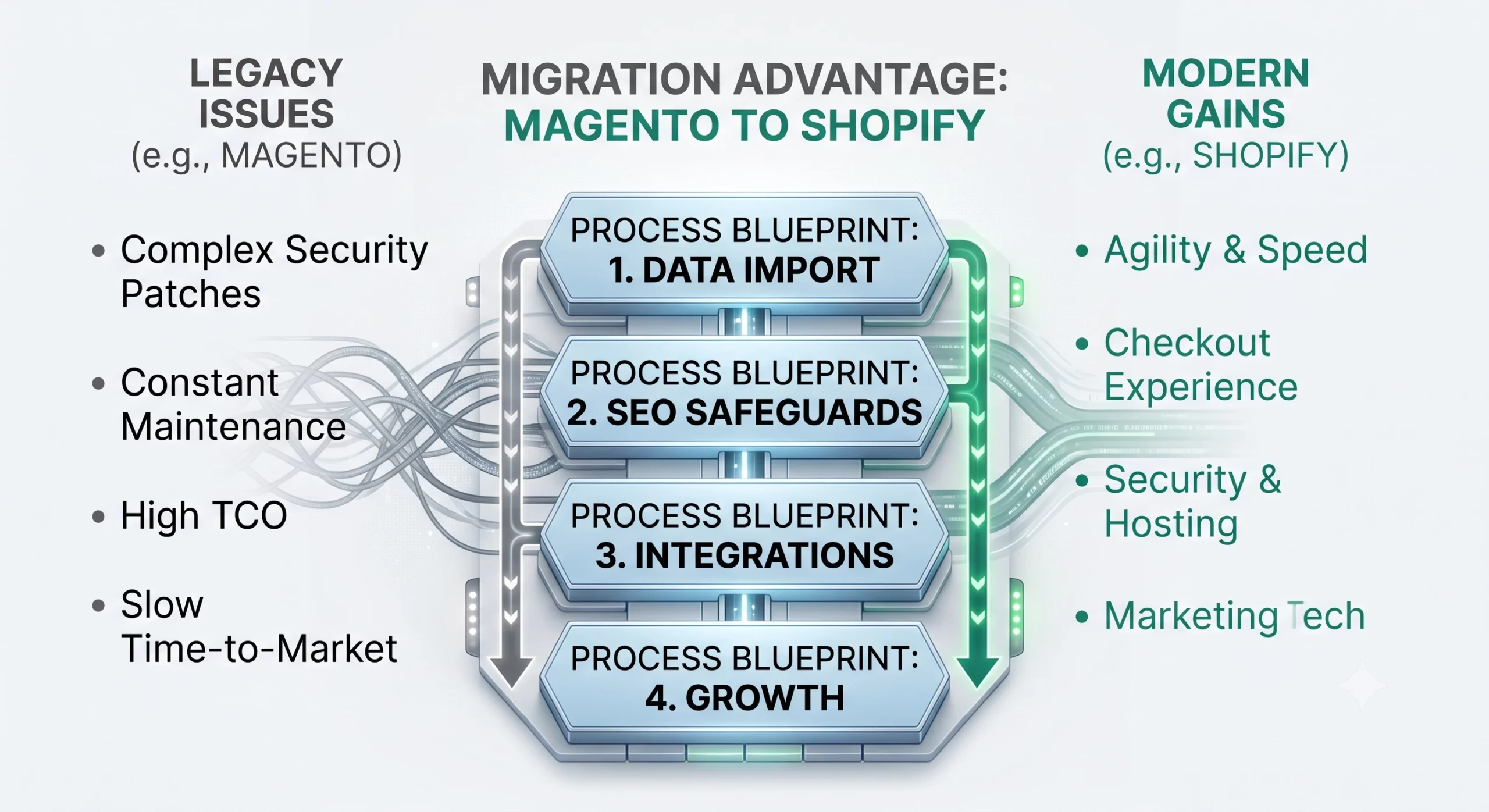
While Magento provides undeniable enterprise features, its operational overhead has become a major bottleneck for modern, agile D2C brands. Instead of investing budgets into customer acquisition and product development, merchants find themselves trapped in endless cycles of server upgrades and emergency hotfixes. When daily operations are bottlenecked by platform instability, it’s a clear sign that the cost of staying on Magento outweighs the benefits.
Total Cost of Ownership (TCO)
High hosting fees, mandatory security patches, and constant extension debugging drain budgets.
Developer Dependency
Even minor frontend changes require specialized backend Magento engineering.
Slow Time-to-Market
Launching new marketing tech setups or custom landing pages feels sluggish compared to modern SaaS alternatives.
The Shopify Advantage
Moving to Shopify (Plus) completely rewires how your e-commerce business operates. Instead of viewing your website as a fragile system that might break during high-traffic sales, Shopify treats your platform as an invisible, rock-solid infrastructure. By shifting from a self-hosted monolith to a fully managed SaaS ecosystem, you instantly eliminate server stress and unlock elite operational agility.
Here is a direct breakdown of how Shopify’s cloud-first model solves Magento’s most critical infrastructure bottlenecks:
| Feature | Shopify (Plus) | Magento (Adobe Commerce) |
|---|---|---|
| Hosting & Infrastructure | Cloud-based, fully managed, 99.99% uptime | Self-hosted or expensive cloud infrastructure |
| Security & Compliance | Level 1 PCI-DSS compliant out of the box | Manual security audits and patch deployments |
| Checkout Experience | Shopify Checkout (highest converting globally) | Highly customized but prone to checkout friction |
| Maintenance Overhead | Zero. Platform updates automatically | Heavy technical debt and version upgrade risks |
The bottom line is simple: Magento forces you to act like a software hosting company; Shopify lets you focus entirely on being a D2C brand. By switching to a platform where security, hosting, and checkout conversion are optimized automatically at a global scale, your team wins back hundreds of development hours. This transition fundamentally shifts your engineering budget from passive platform maintenance to active revenue-generating features.
Pre-Migration Checklist
Magento architectures are deeply layered. Start this audit at least 3 weeks before your target launch date to map custom attributes properly.
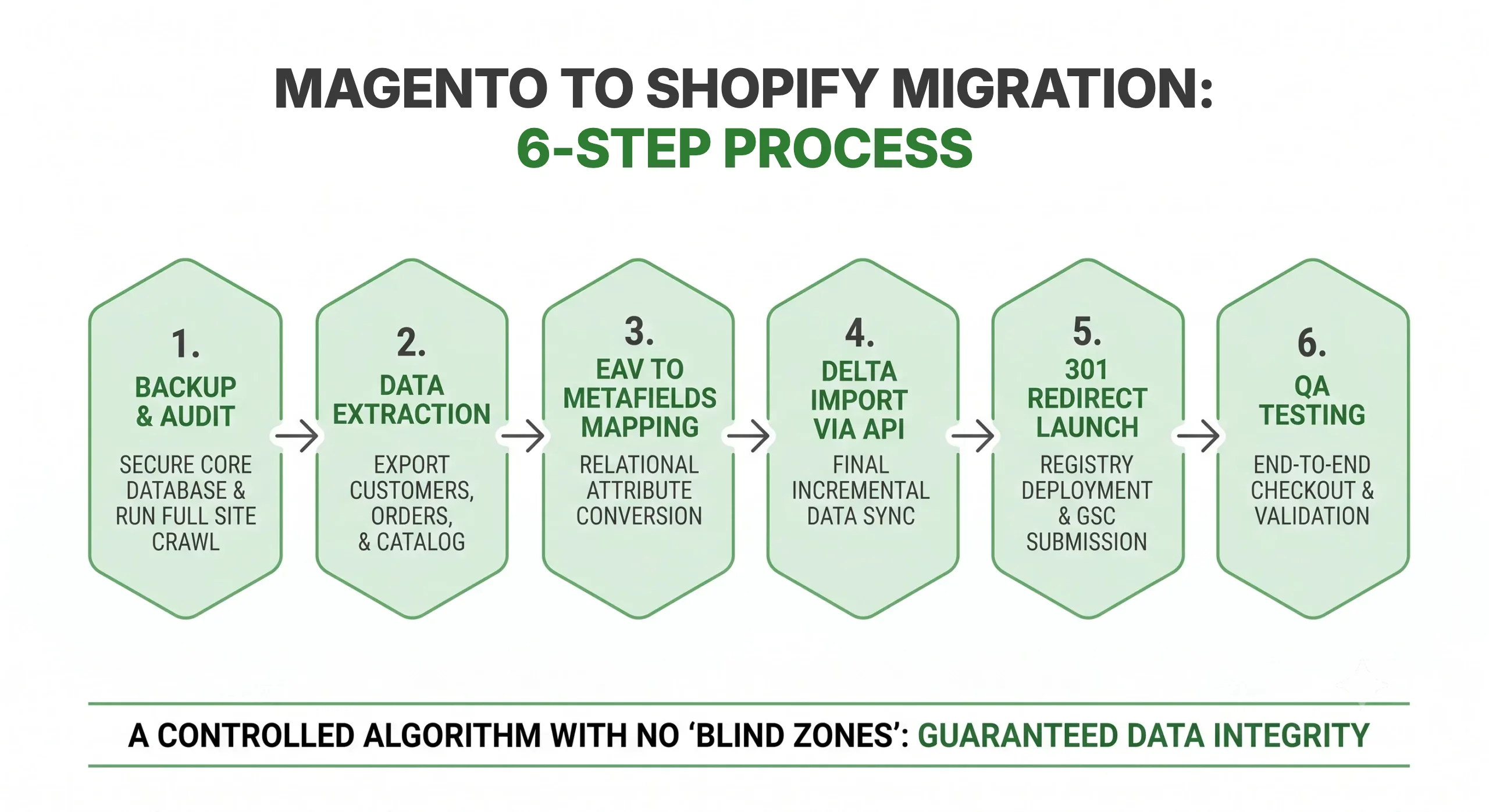
Secure a Core Database Backup
Export all XML and SQL files from your Magento server.
Map Custom Product Attributes
Magento uses complex Attribute Sets (e.g., specific sizing charts or material specifications) that need to be translated into Shopify Metafields.
Audit Your Extension Stack
Make a list of your active Magento modules (ERP, CRM, loyalty programs) and match them with reliable Shopify ecosystem alternatives.
Run an SEO Inventory
Crawl your entire site using Screaming Frog to document all live URLs, meta structures, and category hierarchies.
The Step-by-Step Migration Blueprint
1. Set Up and Configure Your Shopify Environment
Create your store instance (often Shopify Plus for enterprise Magento switchers), configure global settings, tax rules, and multi-currency targets.
2. Data Extraction and Formatting
Magento databases store data across hundreds of relational tables. Export your core entities:
Products, complex variants, and inventory levels.
Customer profiles and historical order data.
Active coupon codes and customer reviews.
3. Secure Data Import
Because of Magento’s data complexity, manual CSV imports rarely work cleanly for enterprise catalogs.
Automated Migration Tools: Solutions like Matrixify or LitExtension allow you to map Magento’s EAV (Entity-Attribute-Value) model directly onto Shopify’s product structure.
API-Driven Custom Imports: For complex B2B/D2C hybrid models, utilizing Shopify’s REST or GraphQL Admin API ensures zero dropped database connections.
4. URL Structure Alignment & 301 Redirects
Magento URLs often look like /category/subcategory/product.html. Shopify utilizes a strict /collections/ and /products/ architecture. You must build a comprehensive 301 redirect map in Shopify’s navigation panel to prevent a post-launch drop in organic search rankings.
5. Performance and Payment Testing
Run end-to-end sandbox transactions, test your automated Klaviyo/CRM email triggers, and verify that third-party logistics (3PL) integrations sync instantly.
Real-World Impact: An international apparel brand migrated from an unoptimized Magento 2 setup to Shopify, resulting in a 34% improvement in mobile page speed (LCP) and an immediate 4.2% lift in checkout conversions.
Preserving Enterprise SEO Integrity
Maintaining your search visibility is the most critical part of an e-commerce platform migration.
Migrate Meta Tags Accurately
Ensure meta titles, descriptions, and alt tags are imported precisely via field-mapping.
Handle Canonicalization
Shopify automatically structures canonical tags, eliminating the duplicate content issues often found in Magento’s multi-store views.
Submit Your New Sitemap
Instantly verify your new sitemap.xml inside Google Search Console on launch day to accelerate re-indexing.

let's talk
Looking for a hands-off transition? Replatforming from enterprise setups involves complex data mapping, custom backend integrations, and precise API configurations.
Common Roadblocks and How to Avoid Them
Challenge: Customer Passwords
Magento passwords cannot be decrypted due to advanced hashing.
Solution: Migrate customer profiles as “invited.” Use an automated email campaign offering a launch-day discount to incentivize customers to activate their new accounts and reset passwords.
Challenge: Heavy Data Loss during Live Transition
Solution: Perform a “delta migration” right before going live to capture any orders or new customers that interacted with your old Magento store during the build phase.
CHALLENGE: COMPLEX INTEGRATIONS & CUSTOM ECOSYSTEMS
Magento stores often rely on bloated, custom-coded modules for ERP or warehouse management that can’t be directly copied.
Solution: Map out your tech stack early. Replace legacy modules with modern Shopify Apps or leverage Shopify’s robust GraphQL API and Shopify Functions to rebuild essential business logic cleanly.
CHALLENGE: ACCIDENTALLY DROPPING SEO RANKINGS
Magento’s flexible URL structures (like .html extensions) conflict with Shopify’s native path architectures, risking massive traffic loss.
Solution: Generate a bulletproof 301 redirect map prior to launch. Use tools like Matrixify to bulk-upload your redirect registry and monitor Google Search Console daily post-launch to catch and patch 404 leaks.
Conclusion
Migrating from Magento to Shopify relieves your D2C brand of technical debt, shifts budgets from maintenance to marketing, and provides a rock-solid, high-converting foundation for growth. With proper planning, data mapping, and expert technical execution, your brand can upgrade its tech infrastructure without losing a single dollar in organic traffic.
Choosing the right development partner ensures that this complex transition happens seamlessly behind the scenes while your business continues to run. If you want to understand exactly how our engineering team handles every step of this process—from database refactoring to API integrations—explore our comprehensive Shopify Migration Services page. Let’s eliminate your platform limitations and build a scalable foundation tailored for your brand’s next growth phase. Book a discovery call with URich today to map out your migration strategy.
Moving from WooCommerce rather than Magento? Our WooCommerce to Shopify migration guide covers the same process step by step.
FAQ
No. Shopify’s robust API ecosystem connects seamlessly with major enterprise systems like SAP, NetSuite, and Microsoft Dynamics, allowing for real-time inventory and order syncing.
Absolutely. While we often recommend optimizing UX during a rewrite, our team can replicate your exact Magento frontend look and feel onto a faster, cleaner Shopify Liquid or Headless framework.
Depending on catalog complexity and third-party integrations, a typical migration spans between 4 to 8 weeks of development and QA testing.