

MIGRATION FROM WOOCOMMERCE TO SHOPIFY – THE COMPLETE GUIDE
 By Jane Kholmetskaya, CTO — 06 May 2026
URICH SHOWS HOW TO SMOOTHLY REPLATFORM YOUR STORE TO SHOPIFY - WITHOUT LOSING SEO, DATA, OR CUSTOMER EXPERIENCE.
A WooCommerce to Shopify migration moves a store’s products, customers, orders, content and URLs from a self-hosted WooCommerce (WordPress) site to Shopify, ideally without losing search rankings or customer experience. Moving your D2C brand from WooCommerce to Shopify can unlock faster performance, better scalability, and a smoother customer experience. But if done incorrectly, migration can lead to lost traffic, broken links, and poor data handling. This comprehensive guide walks you through every step–from planning to post–launch optimization – ensuring a seamless migration with no compromise. Prefer a team to handle it end to end? See our WooCommerce to Shopify migration service.
WHY BRANDS MIGRATE FROM WOOCOMMERCE TO SHOPIFY
D2C brands in fashion, beauty, and lifestyle niches often outgrow WooCommerce as they scale. Here are the main reasons why our clients at URich choose Shopify:
- Ease of use: Shopify simplifies operations with a clean admin panel and robust third-party integrations.
- Better performance: Faster load times and mobile–optimized themes.
- Built-in hosting and security: No need to manage your own servers or updates.
- Ecosystem of tools: From Shopify Flow to advanced analytics and marketing automation.
Example: A mid-sized skincare brand saw a 40% drop in cart abandonment after migrating to Shopify, thanks to faster checkout and integrated payment gateways.
WOOCOMMERCE VS SHOPIFY: WHAT ACTUALLY CHANGES
The two platforms work differently, and that decides what has to be rebuilt rather than moved:
- Hosting and security. WooCommerce is self-hosted on WordPress, so hosting, updates, backups and security patches are on you or your agency. Shopify is a hosted platform where hosting, SSL and platform updates are included.
- Extensions. WordPress plugins do not carry over; each one is replaced with a Shopify app, a native feature or a custom app.
- Checkout. WooCommerce checkout is fully customizable in code or with plugins; Shopify uses a hosted checkout, with deeper customization on Shopify Plus.
- URLs. WooCommerce uses /product/… and /product-category/…; Shopify uses /products/… and /collections/…, so a redirect map is required.
- Cost structure. WooCommerce software is free, but you pay for hosting, premium plugins and themes, and maintenance. Shopify charges a monthly subscription plus apps and payment processing fees; check current prices on shopify.com/pricing.
PRE-MIGRATION CHECKLIST: PLANNING IS EVERYTHING
Before migrating, take the time to audit your current store and define your goals.
WOOCOMMERCE TO SHOPIFY MIGRATION PLANNING CHECKLIST
- Audit your current WooCommerce store: Review your products, categories, tags, customer data, order history, and existing URLs.
- Define the new store architecture: Plan your Shopify collections, product types, navigation menus, and content hierarchy.
- Select a Shopify plan: Choose the plan that fits your business size and expected growth.
- Set up a Shopify development store: Begin configuration and theme setup without disrupting your live site.
- Back up all WooCommerce data: Use tools like UpdraftPlus or WP All Export for safety.
- Create a 301 redirect map: Match all old URLs to their new equivalents to preserve SEO.
- Identify WooCommerce plugins used: List out all extensions and find matching or native Shopify alternatives.
- Perform an SEO audit: Document your current rankings, metadata, internal links, and canonical structure.
- Communicate with your team: Assign responsibilities and set realistic timelines.
MIGRATING DATA: PRODUCTS, ORDERS, CUSTOMERS, CONTENT
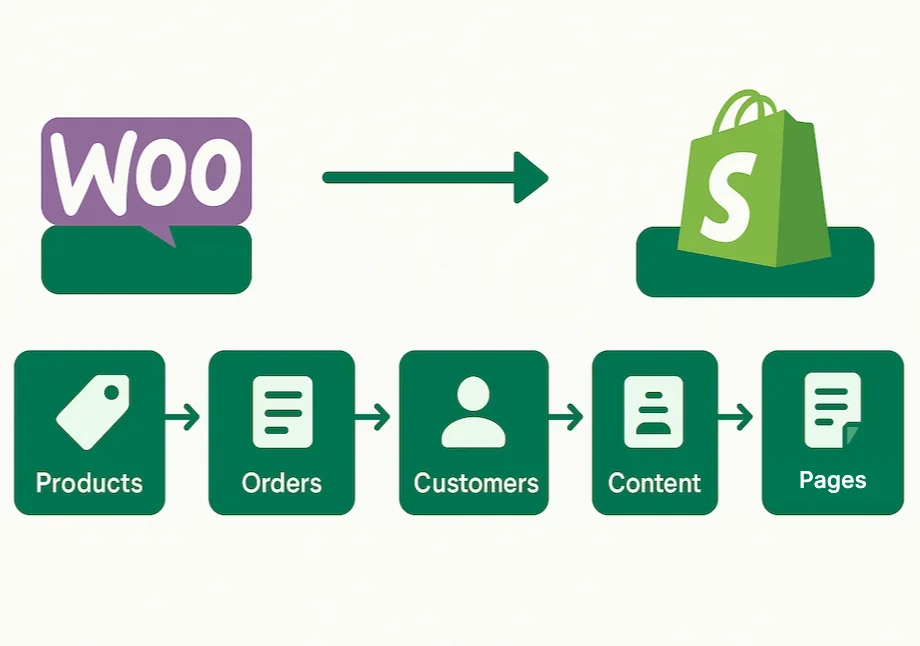
Data integrity is critical. URich uses automated tools and custom scripts to ensure complete and accurate data migration.
WHAT CAN BE MIGRATED?
- Products: Titles, SKUs, variants, pricing, images, inventory levels
- Orders: Order history, statuses, transaction records
- Customers: Profiles and purchase history
- Content: Pages, posts, reviews, media (with URL handling)
WHAT MIGRATES AND WHAT NEEDS PLANNING
| Item | How it moves | What to know |
|---|---|---|
| Products, variants, SKUs, images and inventory | Migrated | WooCommerce categories become Shopify collections. |
| Orders | Migrated as history | Statuses and transaction records are imported for reference. |
| Customers | Migrated | Profiles and purchase history. Shopify cannot import WooCommerce password hashes natively; without a password-migration add-on, customers get an invitation email and set a new password. |
| Reviews | Migrated through a reviews app | Judge.me or Loox keep the user-generated content. |
| Pages, posts and media | Migrated | URLs change, so each page needs a 301 redirect. |
| Theme and design | Rebuilt | A new Shopify theme is built from the approved design; the WooCommerce theme does not carry over. |
| WooCommerce plugins | Replaced | Each plugin gets a native Shopify feature, an app or a custom app. |
| Subscriptions | Needs dedicated planning | The subscription app and the transfer of saved payment methods depend on your payment provider. |
TOOLS WE USE
- Cart2Cart
- Matrixify (Excelify)
- Custom Shopify API scripts
Tip: For large catalogs (10K+ SKUs), we recommend staging and validating batches before full import.
Each tool covers a different part of the job:
| Tool | Type | What it migrates | Best for |
|---|---|---|---|
| Cart2Cart | Automated migration service (web wizard) | Products, categories, customers, orders, reviews, coupons; keeps order–customer links | Mid-size stores that need full order history moved quickly |
| Matrixify | Shopify app for bulk CSV/XLSX import | Products with variants and metafields, customers, 301 redirects, blog posts | Large or complex catalogs, metafield data and bulk redirect lists |
| Shopify CSV import | Native Shopify feature, free | Products and customers via Shopify’s CSV templates | Small catalogs (under 1,000 SKUs) without order history |
| Custom Shopify API scripts | Scripts written by developers | Any data the standard tools cannot map, such as custom fields | Complex data structures and very large catalogs |
SEO MIGRATION: PRESERVE YOUR ORGANIC TRAFFIC
SEO is the most sensitive part of replatforming - 301 maps, metadata, internal links, schema, and image SEO all have to survive the move. We cover the complete process, step by step, in Part 2 of this series: How to Migrate from WooCommerce to Shopify Without Losing SEO.
Five things decide whether rankings survive the move:
- A one-to-one 301 redirect map. Every important old URL points to its closest new equivalent, with no redirect chains and no mass redirects to the homepage.
- Metadata carried over. Titles and meta descriptions move with the page.
- Structured data and image alt text restored. They are easy to lose in the move and have to be restored.
- Internal links updated. Links that still point to old URLs create redirect chains.
- One change at a time. Change the platform first, stabilize it, then optimize the content, so a ranking drop can be traced to its cause.
URL patterns differ between the platforms: a product at /product/organic-face-cream/ becomes /products/organic-face-cream on Shopify, and a category at /product-category/skincare/ becomes /collections/skincare. That is why the redirect map matters.
Even with a clean migration, Google needs time to re-crawl the new structure. A temporary traffic dip of 5–10% for 14–21 days is possible and normal. The full checklist is in Part 2 of this series.
POST-MIGRATION QA AND LAUNCH
Before going live, we run a comprehensive QA process.
OUR LAUNCH-DAY QA INCLUDES:
- Testing cart, checkout, and payment flows
- Reviewing mobile responsiveness
- Broken link scans
- Redirect validation
- Load testing and performance tuning
After launch, we monitor traffic, sales, and crawl data to ensure a healthy transition. Here is what we check:
| What we check | Where | What we look for |
|---|---|---|
| 404 errors and redirects | Google Search Console | A URL missing from the redirect map shows up here as a 404 and gets fixed first. |
| Traffic and sales | GA4 and Shopify analytics | Sessions, orders and revenue compared with the pre-migration baseline. |
| Crawl data | Search Console and a site crawl | Pages being crawled and indexed, no unexpected redirect chains or broken links. |
| Core Web Vitals | Search Console and PageSpeed Insights | A new theme can be fast, but heavy third-party apps can slow it down. Target: LCP under 2.5 seconds. |
| Internal links | Site crawl | Links still pointing to old URLs create redirect chains; update them to the new addresses. |
| Cart, checkout and payments | Test orders | Every payment method and the full checkout flow still work after launch. |
HOW LONG DOES A WOOCOMMERCE TO SHOPIFY MIGRATION TAKE?
Timelines depend mostly on catalog size and on how much custom functionality has to be rebuilt. For stores under 5,000 SKUs, a migration typically takes about 3–4 weeks; larger stores may take 6–8 weeks, including QA and the SEO transition. Custom functionality and integrations can add time to either range. These factors usually do:
- Custom WooCommerce functionality that needs a Shopify app or a custom app
- Integrations with CRM, ERP, email or analytics tools
- Subscriptions and recurring payments
- Multiple languages or currencies
- Messy catalog data that has to be cleaned before import
COMMON MISTAKES TO AVOID
- Missed redirects. A URL left out of the map becomes a 404 and loses the ranking and links it had.
- Changing the platform and the content at once. If rankings drop, you cannot tell whether the migration or the new copy caused it.
- App bloat. Heavy third-party apps slow the new theme down and hurt Core Web Vitals.
- Lost tracking and integrations. Reconnect GA4, ad pixels, email marketing and ERP before launch and confirm that test orders reach every system.
- Skipping batch validation on large catalogs. For 10K+ SKUs, stage and validate the data in batches before the full import.
HOW URICH HELPS D2C BRANDS MIGRATE WITH CONFIDENCE
As a Shopify Partner, URich has led dozens of successful migrations from WooCommerce. Our custom approach combines:
- Technical audit and strategy
- Full data migration
- SEO protection and enhancement
- Shopify theme setup and CRO best practices
- Integration with CRM, ERP, Klaviyo, GA4, and more
Ready to replatform without the risk? Book a free consultation with URich and let our developers and eCommerce strategists handle your WooCommerce to Shopify migration.
Part 2 of this series: How to Migrate from WooCommerce to Shopify Without Losing SEO - the full SEO checklist.
FAQ
For stores under 5,000 SKUs, around 3–4 weeks. Larger stores may take 6–8 weeks, including QA and the SEO transition.
Not if the move is planned for SEO. Every indexed URL gets a 301 redirect to its new equivalent, and metadata, internal links and structured data are carried over. Expect some fluctuation while Google re-crawls and re-indexes the new store. The full checklist is in Part 2 of this series.
Products (titles, SKUs, variants, pricing, images and inventory levels), orders (history, statuses and transaction records), customers (profiles and purchase history) and content (pages, posts, reviews and media).
Cart2Cart, Matrixify and custom Shopify API scripts. For large catalogs (10K+ SKUs) we stage and validate the data in batches before the full import.
No. We migrate reviews using tools like Judge.me or Loox, retaining user-generated content and SEO benefits.
Yes. We help with DNS setup to point your domain to the new Shopify store with near-zero downtime.
The new store is built and tested on a Shopify development store while your WooCommerce site stays live. The switch at launch is a DNS change, so downtime is near zero.
WooCommerce plugins don't carry over to Shopify. During the audit we list every extension in use and replace each one with a native Shopify feature or an app, or build a custom app when nothing off the shelf fits.
Standard Shopify suits startups and growing D2C brands. Shopify Plus makes sense when you need checkout customization, B2B features, higher API limits or multi-store setups. During discovery we model your catalog, traffic and integrations and recommend the plan that pays off; upgrading later is straightforward.
Shopify has built-in technical SEO features and faster performance, but the outcome depends on execution. URich ensures nothing is lost and often improves SEO visibility.
READY TO SWITCH TO SHOPIFY WITHOUT THE STRESS?
Our developers and eCommerce experts plan and run the migration from WooCommerce end to end – from the audit and data transfer to redirects and launch QA. See our WooCommerce to Shopify migration service or book a free consultation.